
Redux Ultra™ Support
Everything you need to know about using your Redux Ultra drying and charging system.
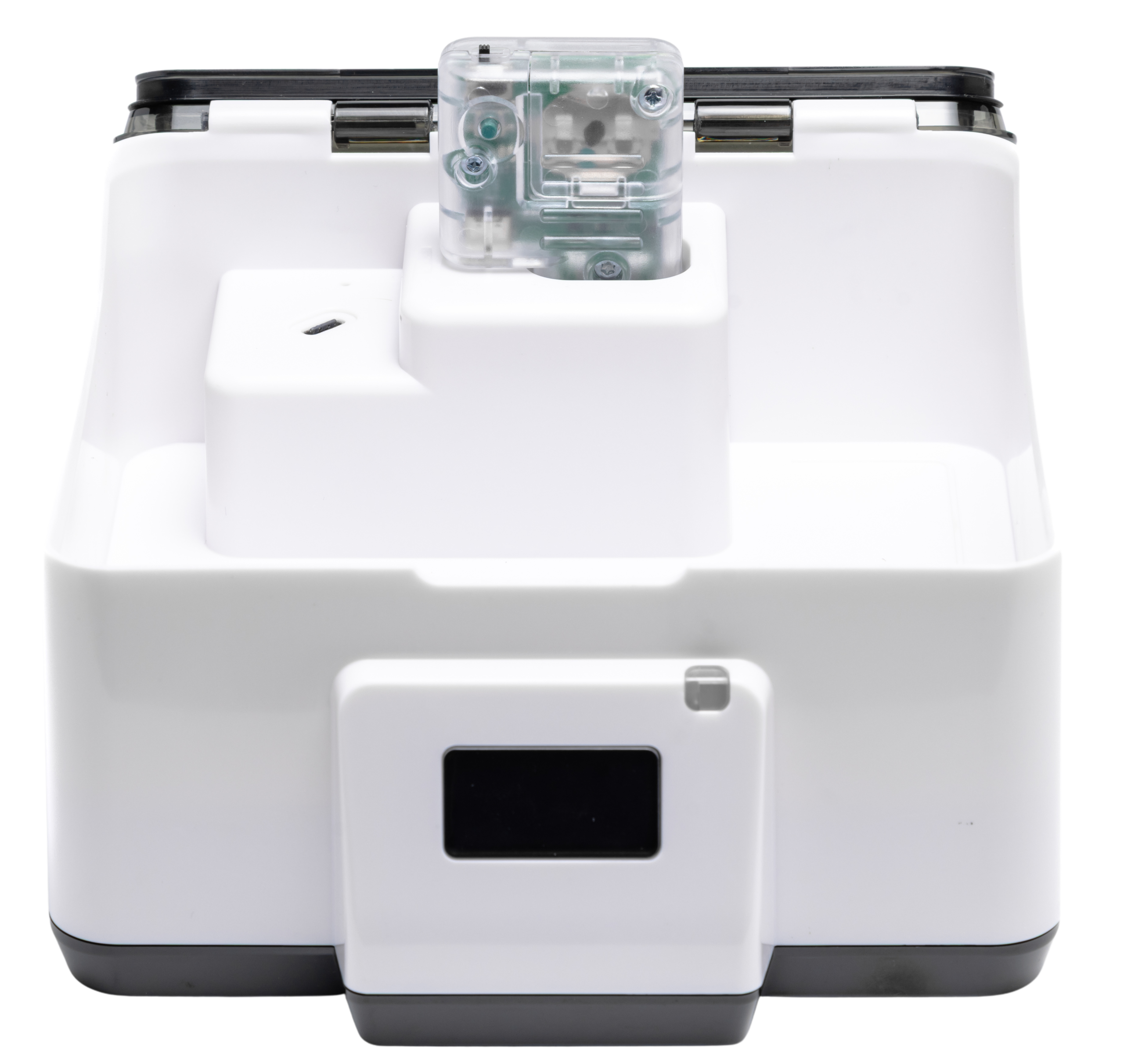
How Your Redux Ultra™ Works
Drying and charging system powered by DryBUDDY™ technology
Redux Ultra (UDC) System
Drying with simultaneous charging
Key Components:
- Power Port (USB-C) - Powers UDC unit and DryBUDDY
- Display Screen - Shows real-time status messages
- DryBUDDY™ Pocket - Houses the desiccant module
- USB-C Charge Port (Internal) - Charges devices while drying
- Fresh Air Inlet - Controlled air circulation
- Ambient Light Detector - Auto-adjusts screen brightness
DryBUDDY™ Module
The desiccant engine inside the UDC
Key Components:
- Electronic Rice™ Chamber - Advanced desiccant beads
- USB-C Port - Connects to UDC for power and reactivation
- Moisture Sensor - Monitors saturation levels
- Heating Element - Reactivates desiccant automatically
- Moisture Absorption Vents - Optimized air circulation
- Thermal Protection - Safe operation during reactivation
Detailed User Guide
Step-by-step instructions for using your Redux Ultra
Ready for Operation
System ready to begin a dry cycle. Place devices inside and close lid.
Dry Cycle Running
Drying cycle in progress. Keep lid closed. Time varies by moisture level.
Cycle Finished
Drying complete. Safe to remove devices. System ready for another cycle.
Auto-Reactivation Running
UDC detected saturated electronic rice. 3-hour reactivation cycle in progress. No action required.
Cool-Down Period
Reactivation finished. Electronic rice cooling before next use. Wait for "READY" message.
System Ready After Reactivation
Cooling complete. Electronic rice fully recharged. System ready for drying.
DryBUDDY Not Detected
UDC cannot detect DryBUDDY module. Remove and reinstall ensuring proper seating.
System Initializing
UDC is booting up. Display will show "READY TO DRY" when initialization complete.
Initial Setup
Prepare your Redux Ultra for first use:
- Remove DryBUDDY from protective silver pouch
- Install DryBUDDY into UDC chamber pocket (push until flush)
- Connect power supply: USB-A to power block, USB-C to UDC power port
- Plug power block into wall outlet
- Display shows "HELLO" then "READY TO DRY"
Drying Hearing Aids in Charging Cases
For simultaneous drying and charging:
- Place hearing aids in their charging case
- Connect case's USB-C cable to internal UDC charge port
- Place connected case inside UDC chamber
- Close lid fully (until it contacts chamber)
- Display shows "DRY IN PROGRESS"
- Hearing aids dry while charging simultaneously
Drying Other Small Electronics
For earbuds, phones, or other devices:
- Optional: Connect device to internal USB-C charge port
- Place device directly in chamber (no charge cable needed to dry)
- Place in center of chamber for optimal airflow
- Close lid fully
- Dry cycle runs automatically (2-4 hours typical)
Automatic Reactivation System
UDC monitors electronic rice health and reactivates automatically:
- No user action required—fully automatic
- Display shows "REACTIVATING" when cycle begins
- 3-hour heating cycle releases absorbed moisture
- Display shows "COOLING DOWN" then "READY"
- Reactivation frequency varies based on usage and humidity
- Keep DryBUDDY installed in UDC at all times
UDC Doesn't Power On
Possible Cause
Power supply not connected or wall outlet not working
Solution
- Check USB-C cable connection at back of UDC
- Verify wall adapter is plugged in securely
- Try different wall outlet to rule out outlet issue
- Inspect cable for visible damage or fraying
Dry Cycle Didn't Start
Possible Cause
DryBUDDY™ not properly installed or lid not fully closed
Solution
- Confirm DryBUDDY™ is fully seated in pocket (should sit flush)
- Check display—if shows "INSTALL DRY BUDDY™", reinstall module
- Ensure lid is pressed down until it contacts chamber
- Remove any obstructions preventing lid closure
- If "READY TO DRY" displays, reboot UDC by unplugging for 5 seconds
Lid Doesn't Fully Close
Possible Cause
Device or charging cable preventing lid from seating properly
Solution
- Ensure devices fit within chamber without touching lid
- Route USB-C charge cable to avoid pinching under lid
- Check for debris inside chamber preventing closure
- Do not force lid closed—remove obstruction instead
Display Shows "INSTALL DRY BUDDY™"
Possible Cause
UDC cannot detect DryBUDDY™ module via USB-C connection
Solution
- Remove DryBUDDY™ completely from chamber
- Check DryBUDDY™ USB-C port for debris or lint
- Reinstall DryBUDDY™ ensuring proper alignment with pocket
- Push down firmly until seated flush
- Display should update to "READY TO DRY" within 5 seconds
Reactivating Your DryBUDDY™
Restore full performance with UDC's automatic 3-hour reactivation cycle
✓ Your Redux Ultra™ is Pre-Activated!
Both the UDC chamber and DryBUDDY™ module come fully pre-activated from the factory. The Electronic Rice™ is charged and ready for immediate use right out of the box.
Important: Opening the DryBUDDY™ before you're ready to use it exposes the rice to ambient moisture, reducing first-use drying power. If you see dark beads or a red LED when powered on, simply perform reactivation below to restore full performance.
When Reactivation is Needed
The UDC will automatically detect when the DryBUDDY™ desiccant is saturated and begin reactivation. This is a fully automatic process that requires no user action.
Reactivation Display Message
The UDC display will show "REACTIVATING" when the cycle begins. The DryBUDDY™ remains in place—do not remove it during this process.
3-Hour Heating Cycle
The UDC heats the Electronic Rice™ beads inside the DryBUDDY™ to release all absorbed moisture through the fresh air inlet. This process takes approximately 3 hours and is completely automatic.
Cooling Period
Display shows "REACTIVATE COMPLETE / COOLING DOWN". Wait approximately 10 minutes for the Electronic Rice™ to cool to safe temperature. Display will automatically update to "REACTIVATION COMPLETE / READY TO DRY" when cooling is finished.
Ready for Use
The DryBUDDY™ desiccant is now fully recharged and the system is ready for normal operation. The Electronic Rice™ beads are restored to their bright orange color, indicating maximum moisture absorption capacity.
Frequently Asked Questions
Common questions about Redux Ultra™ Dry & Charge
No. Both the UDC chamber and DryBUDDY™ module are pre-activated at the factory. The Electronic Rice™ is fully charged and ready for immediate use right out of the box. Simply power on and start drying.
Opening the DryBUDDY™ early exposes the Electronic Rice™ to ambient moisture, which reduces first-cycle drying power. If the beads appear dark or a red LED shows when powered on, the rice has absorbed moisture. This doesn't damage the device—simply perform a reactivation cycle in the UDC to restore full performance.
Yes, absolutely. The reactivation process heats the Electronic Rice™ to release all absorbed moisture, returning it to factory-fresh condition. After reactivation and cooling, the DryBUDDY™ will perform exactly as it did when new, regardless of whether it was weakened by early opening or normal use.
The UDC has two USB-C ports with different functions:
- Power Port (external, back of unit): Powers the UDC unit itself and provides power to the DryBUDDY™ when installed. Connect to the supplied wall adapter.
- Charge Port (internal chamber): Charges hearing aid cases or other devices while drying simultaneously.
The UDC automatically monitors Electronic Rice™ condition and reactivates as needed. The frequency depends on usage intensity and environmental humidity levels. The system handles this automatically—no user intervention required.
Dry cycle duration varies based on device moisture level. The UDC display shows "DRY COMPLETE" when finished. Typical cycles range from 2-4 hours depending on moisture content.
Yes! This is a key feature of the Redux Ultra. Place your hearing aids in their charging case, connect the case to the internal USB-C charge port, then place the case in the chamber. The hearing aids will charge while drying simultaneously—perfect for overnight use.
Keep the DryBUDDY™ installed in the UDC chamber at all times with the lid closed. This prevents ambient moisture absorption and keeps the Electronic Rice™ fresh and ready for use. The DryBUDDY™ is designed to remain in the UDC as an integral part of the system.
Need More Help?
Our support team is ready to assist you with any questions about your Redux Ultra™.