
Redux Veri-Dry™ Support
Get help with your Veri-Dry™ Hearing Aid Dryer Case. Learn how to use LED indicators, troubleshoot issues, and keep your devices protected.
Getting Started
Quick setup guide for your Veri-Dry™ Hearing Aid Dryer Case
Open the Case
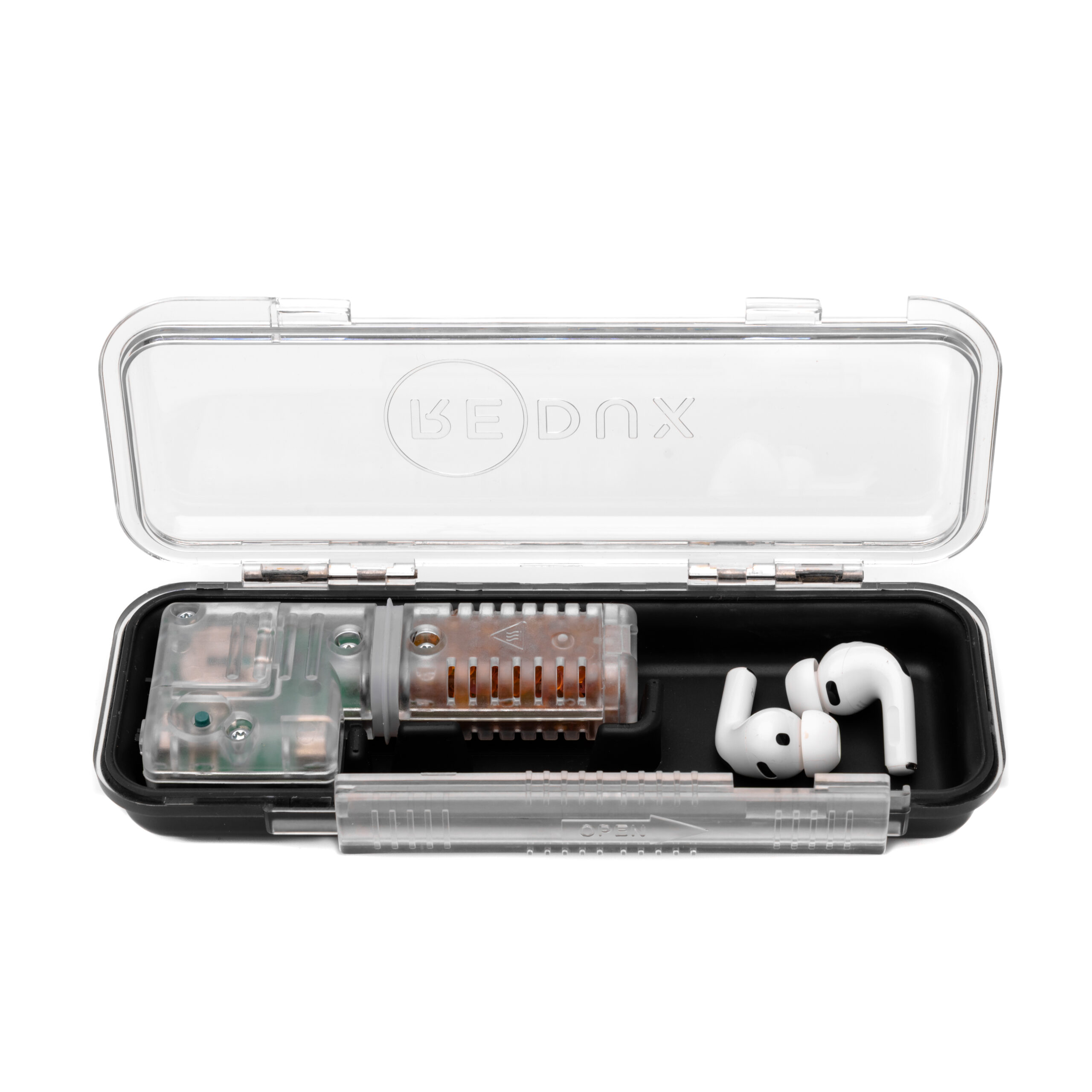
Unlatch and open your Veri-Dry™ case. The DryBUDDY™ unit is pre-installed inside the case compartment.
Place Your Devices
Position hearing aids, earbuds, or other small devices inside the case alongside the DryBUDDY™ unit. Ensure they're not blocking the latch.
Activate DryBUDDY™
Slide the DryBUDDY™ switch to ON. The green LED will begin blinking, indicating the drying cycle has started.
Close & Seal
Close the case lid and secure the latch. The watertight seal creates an optimal drying environment for the Electronic Rice™ beads.
Wait for Completion
Drying typically takes 3-6 hours. The green LED will turn solid when complete. Auto-shuts off after 20 hours.
Remove Devices
Open the case once the LED is solid green. Your devices are now 100% moisture-free and ready to use.
LED Indicator Guide
Understanding your DryBUDDY™ status lights inside Veri-Dry™
Drying in Progress
Green LED blinking indicates the DryBUDDY™ unit is actively removing moisture from your devices. Typical drying cycle is 3-6 hours. Auto-shuts off after 20 hours.
Drying Complete
Solid green LED means your devices are 100% moisture-free and ready to use. LED remains on for 4 hours, then automatically turns off. Safe to open case and remove devices.
Idle (Deep Sleep)
No LED means DryBUDDY™ is in standby mode. Slide switch OFF when not in use to save CR2032 battery life. Battery typically lasts 6-12 months with regular use.
Red LED Solid
Electronic Rice™ beads are saturated with moisture and need reactivation. Use the included Reactivation Sleeve to dry out the beads (see Care & Reactivation tab).
Travel Tip: Veri-Dry™ is TSA-friendly. No wall power needed during the drying cycle (uses CR2032 battery). The watertight case protects your devices during transport while DryBUDDY™ works.
Troubleshooting Guide
Common issues and quick fixes for Veri-Dry™
No LED Response
If the DryBUDDY™ unit shows no lights when the switch is turned on:
- Check battery installation: Remove DryBUDDY™ from case, slide switch OFF, ensure CR2032 battery is installed correctly (+ side up).
- Replace battery: CR2032 batteries last 6-12 months. Replace if device has been in use for extended period.
- Verify switch position: Slide switch firmly to ON position. You should feel a click.
- Test outside case: Remove from Veri-Dry™ case and test in open air. If it works, case may be interfering with switch.
Drying Cycle Won't Complete
If green LED keeps blinking beyond 6-8 hours:
- Check moisture load: Heavy moisture (e.g., devices dunked in water) may take longer than 6 hours. Allow up to 20 hours for full cycle.
- Reduce device count: Overloading the case (too many devices at once) extends drying time. Try drying fewer devices per cycle.
- Verify case is sealed: Latch must be securely closed for optimal drying. Open latch allows ambient moisture in.
- Check for extreme humidity: Very humid environments (>80% humidity) can slow the drying process.
Red LED Immediately After Reactivation
If red LED appears right after reactivating Electronic Rice™ beads:
- Reactivation sleeve time: Ensure DryBUDDY™ stayed in reactivation sleeve for full 3 hours. Insufficient time = incomplete drying of beads.
- Check ambient moisture: If reactivating in humid room, beads may re-absorb moisture immediately. Reactivate in dry environment.
- Cool down period: After removing from sleeve, let DryBUDDY™ cool for 15 minutes before inserting in case. Hot beads can trigger red LED briefly.
- Bead lifespan: Electronic Rice™ beads last 2-3 years. If reactivation doesn't clear red LED after multiple attempts, beads may need replacement (contact support).
Case Won't Latch Properly
If Veri-Dry™ case won't close or latch securely:
- Check device placement: Ensure devices and DryBUDDY™ unit are positioned flat inside case, not blocking latch mechanism.
- Remove excess items: Case is designed for small devices (hearing aids, earbuds, watch without strap). Oversized items prevent closure.
- Inspect for damage: Check latch mechanism for cracks or damage. Clean any debris from latch groove.
- Verify DryBUDDY™ fit: Ensure DryBUDDY™ unit sits flush in designated compartment. If tilted or elevated, it may prevent closure.
Still need help? Contact Redux Support at support@redux.com or call 1-866-267-3389. Have your purchase date and serial number ready.
Care & Reactivation
Maintaining your Veri-Dry™ and reactivating Electronic Rice™ beads
Reactivation Process
Remove DryBUDDY™
Open Veri-Dry™ case, remove DryBUDDY™ unit, and slide switch to OFF position.
Insert in Sleeve
Place DryBUDDY™ into the included Reactivation Sleeve. Ensure unit is fully inserted.
Wait 3 Hours
Leave DryBUDDY™ in sleeve for 3 hours. This fully reactivates the Electronic Rice™ beads for continued use.
Cleaning Your Veri-Dry™ Case
Exterior: Wipe case exterior with damp cloth. Do not submerge entire case in water (DryBUDDY™ unit is inside).
Interior: Remove DryBUDDY™ unit, wipe interior with dry or slightly damp cloth. Allow to air dry completely before reinserting DryBUDDY™.
Latch mechanism: Keep free of debris. Use compressed air to clean latch groove if needed.
Reactivation Frequency
Normal use (daily): Reactivate every 30-45 days when red LED appears.
Heavy use (multiple devices daily): May need reactivation every 2-3 weeks.
Light use (occasional): May only need reactivation every 2-3 months.
Tip: The sealed Veri-Dry™ case provides protection during storage and travel. DryBUDDY™ reactivation frequency depends on usage patterns and moisture levels.
Battery Replacement
Battery type: CR2032 coin cell battery (included with DryBUDDY™ unit)
Lifespan: 6-12 months with regular use
How to replace: Remove DryBUDDY™ from case, slide switch OFF, gently twist/pry open battery compartment, insert new CR2032 with + side up, close compartment, slide switch ON to test.
Tip: Replace battery when LED becomes dim or doesn't respond quickly to switch activation.
Warranty Coverage: Veri-Dry™ includes a 12-month limited warranty. Covers manufacturing defects but not normal wear, accidental damage, or improper use. Keep your receipt for warranty claims.
Frequently Asked Questions
Quick answers to common Veri-Dry™ questions
Yes! Veri-Dry™ is TSA-friendly and safe to use during air travel. The DryBUDDY™ unit operates on a CR2032 battery (no lithium-ion), and no power is needed during the drying cycle.
Simply place your devices inside, close the case, and let it work while you travel. The watertight case also protects against cabin pressure changes.
Veri-Dry™ is designed for small devices:
• 2 hearing aids (or 1 set with charging case)
• 2 earbuds + case (like AirPods)
• 1 smartwatch (strap must be removed)
• Multiple small items (memory cards, keys, etc.)
The key is ensuring devices fit comfortably without forcing the case closed. Overloading reduces drying efficiency and prevents proper case seal.
No. Veri-Dry™ is specifically designed for small devices like hearing aids, earbuds, and smartwatches. Smartphones and tablets are too large to fit inside the case.
For larger devices with severe water exposure (dunking in lake, pool, toilet), professional vacuum drying is the most effective solution. Find a Redux provider near you for professional-grade drying services.
Veri-Dry™ includes a DryBUDDY™ unit inside a protective watertight storage case.
Key benefits:
• Watertight protection: Impact-resistant case protects devices during transport
• All-in-one solution: Storage + drying in one compact case
• Travel-friendly: TSA-approved, no wall power needed during drying (CR2032 battery)
• Sealed environment: Minimizes ambient moisture exposure to DryBUDDY™ when stored
Standalone DryBUDDY™ works great for at-home use with mylar bags or containers, while Veri-Dry™ offers the convenience of a purpose-built watertight case designed for travel and on-the-go protection.
Yes! Veri-Dry™ uses heatless Electronic Rice™ technology, which is safe for all hearing aid types:
• Behind-the-ear (BTE)
• In-the-ear (ITE)
• In-the-canal (ITC)
• Completely-in-canal (CIC)
• Receiver-in-canal (RIC)
The gentle desiccant-based drying won't damage sensitive electronics, batteries, or microphones. No heat means no risk of warping plastic components or degrading seals.
The Reactivation Sleeve is reusable indefinitely with proper care. It's designed to last the lifetime of your DryBUDDY™ unit.
Care tips:
• Store in dry location between uses
• Do not puncture or tear the sleeve material
• Avoid exposing to excessive heat (>140°F) when not in use
• Replace only if material becomes damaged or torn
Each reactivation session (3 hours) fully restores the Electronic Rice™ beads' moisture absorption capacity.
Yes! Veri-Dry™ is designed for overnight use. Most users follow this routine:
Evening: Place devices in case with DryBUDDY™ turned ON, close case
Overnight: DryBUDDY™ completes 3-6 hour drying cycle, then auto-shuts off
Morning: Devices are 100% dry and ready to use, stored safely in watertight case
The sealed case doubles as a protective storage solution, keeping devices safe from dust, moisture, and impacts even when not actively drying.
Veri-Dry™ handles normal moisture exposure (splashing, sweating, humidity, light rain). For severe water exposure (dunking in lake, pool, toilet), vacuum drying is more effective:
Immediate steps:
1. Remove devices from water immediately
2. Shake out excess water
3. Pat dry with towel
4. Find a Redux provider for professional vacuum drying
Consumer drying products like Veri-Dry™ are excellent for daily moisture management but not designed for complete submersion recovery. Professional vacuum dryers extract water from internal components more quickly and thoroughly.
Need More Help?
Our support team is ready to assist you with any questions about your Redux Veri-Dry™.